


Hago- Party, Chat & Games
4.26.63K Reviews
App Specs
- Version
- 5.53.0
- Updated On
- License
- Free
- Downloads
- 100,000,000+
- Developer
- HAGO
- Categories
- Social
- Platform
- Android, iOS
Screenshots





 Analysis by AppCompare
On a shared phone or tablet, a social app can quickly become more than a way to pass time: it can blend games, conversations, and people who do not all know one another. That mix is the main appeal of Hago - Party, Chat & Games, and it is also why I would decide in advance who is using it and what kind of interaction is welcome. It suits a household that enjoys casual multiplayer play and is comfortable with social discovery; it is a less natural fit for someone who only wants quiet, offline games.
When a shared session works well
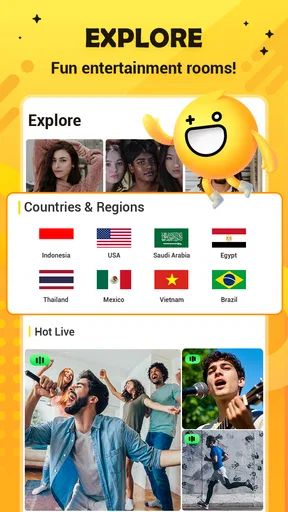
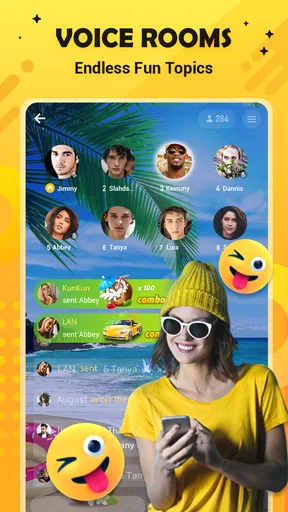
I can picture using Hago during a relaxed evening when one person wants a quick game and another is happy to join a voice room or browse live streams. The social layer gives people more ways to spend time together than taking turns on a single puzzle, while the mini-games can offer an easy starting point if nobody has a topic for conversation. It works best when everyone treats the app as a shared activity rather than assuming that every room or player is part of a familiar circle.
A practical approach is to agree on a simple handoff: the person using the device should say whether they are playing, chatting, or exploring rooms before passing it along. That small pause helps avoid accidental participation in someone else’s conversation and makes it easier to keep playtime intentional. I would also avoid leaving a social room open when another household member is about to use the device.
Set expectations before handing over the device
Hago is a social app as well as a collection of games, so I would not treat it like a basic arcade title that can be passed around without context. If several people use one device, decide whose account is active and make sure each person understands that chats and rooms may involve people outside the household. I would not assume that switching players automatically creates a separate profile or keeps one person’s activity private; the safest habit is to check the active account before starting.
That boundary matters even for adults. A casual game can lead into a voice conversation, and a live stream has a different feel from a private match with someone you know. If a user wants only gameplay, it is sensible to stay focused on the game rather than opening social areas out of curiosity. If someone wants to meet new people, they should do so deliberately and be ready to leave a room that feels uncomfortable.
Coordinate play without turning it into a chore
For a household that plays together, Hago can be an easy option when nobody wants to install several separate games just to find one everyone likes. A useful way to try it is to pick one short activity first, then decide whether the group wants another round or would rather switch to conversation. That keeps a casual session from becoming an unplanned stretch of scrolling through games and rooms.
It also helps to agree on how to handle purchases before anyone explores the app. Hago is free to download, but it includes in-app purchases, with items ranging from about twenty cents to around three hundred five dollars. I would not let a shared device turn into a shared assumption about spending: anyone considering a purchase should check the amount and get the account holder’s approval first.
Worth Reading Before You Choose

Flipboard Shows What News Apps Must Do Beyond the Feed

Switching to Android Auto Means Rethinking Your Driving Routine

Google Calendar Makes a Crowded Week Easier to Manage

Ludo King Makes the Most of the Minutes Between Plans

Baby Panda World Brings Quick Play to Modern Phones, but Its Game Library Feels Busy

ESPN’s Live Game View Makes Following Close Games Easier
Age, trust, and the social side
The app is rated Teen, which gives families a useful starting point for deciding whether it is suitable, but I would still consider the individual user’s comfort with open social interaction. Voice chat and live streams can feel more immediate than text or a turn-based game, and meeting strangers online calls for good judgment. A rating is not a substitute for a conversation about what personal details should stay private and when to leave an interaction.
Hago is made by HAGO and sits in the social category, with games serving as one part of a broader experience. It has a 4.2 average from around 6.4 million ratings and more than 100 million installs, which suggests a large audience, not that every room or game will suit every person. I would judge it by the specific ways my household plans to use it, rather than by popularity alone.
How Hago fits into a household routine
The app is free, runs on Android versions starting with 6.0, and its current version is 5.45.0. It was released on September 18, 2018, and has around 6,600 written reviews. Those details make it a well-established option, but the best reason to install it is still whether your group wants a blend of casual games and social spaces rather than a single-purpose game.
Exploring the Game Galore
Once you download Hago, you’re stepping into a world packed with games that range from casual fun to competitive challenges. Whether you’re into classic board games, strategic puzzles, or fast-paced action, Hago has something for everyone. I’ve spent hours trying different games, and trust me, it’s hard to get bored!
One of my favorites? The classic Sheep Fight. This game is all about strategy and quick reflexes as you try to invade your opponent’s territory. It’s simple, yet so addictive! Plus, there’s a leaderboard feature that adds a competitive edge. I love how it keeps track of your progress and ups the ante with each victory.
Social Features to Keep You Connected
But wait, there’s more! Hago isn’t just about playing games—it’s also a social hub. The app integrates a chat feature that allows you to connect with players from across the globe. You can engage in voice chats, send cute emojis, and even participate in live streams. It’s like having a digital hangout spot right in your pocket.
The app encourages community building which I found super appealing. You can join or create rooms based on your interests. Want to discuss strategies for Fruit Master? There’s probably a room for that! This aspect of Hago really adds depth to the app, making it more than just a gaming platform.
Customizing Your Experience
Now, let’s talk about personalization. Hago offers a neat way to customize your profile with avatars and unique skins. This makes your gaming identity stand out and adds a personal touch. I’ve had a blast customizing my avatar, and it’s a fun way to express a bit of personality in the gaming world.
Moreover, the app’s interface is intuitive and user-friendly. Everything is just a few taps away, and the navigation is smooth. Even if you’re new to mobile gaming, you’ll get the hang of it in no time. The design is bright and cheerful, perfectly matching the fun vibe of the app.
Daily Rewards and Challenges
For those who love a little reward, Hago has you covered. Daily logins and challenges offer coins and other bonuses. It’s a clever way to keep you coming back and adds an extra layer of excitement to the experience. I find myself looking forward to these daily surprises, which makes the whole gaming experience even more engaging.
And if you’re competitive like me, the challenges are a great way to test your skills and earn bragging rights. Completing these tasks can be a fun way to explore different games and improve your gameplay.
Choosing it over a single-purpose app
Compared with a standard messaging app, Hago puts play closer to the conversation: a game can give new acquaintances something to do together, rather than asking them to keep a chat going from scratch. Compared with a dedicated mobile game, it offers more social routes but less of a focused, single-game feel. That trade-off is valuable if variety matters; it can be distracting if you want one polished game without rooms, streams, or other activities competing for attention.
My tip is to use the game itself as the anchor. Pick a title you already enjoy, play a round, and then decide whether the social features add anything to that session. This avoids the common trap of opening an app for a quick match and drifting into unrelated browsing. Someone who prefers private communication with known contacts may be happier using a conventional messaging service alongside a standalone game.
What to expect from a first visit
For a first-time user, I would explore at a comfortable pace rather than trying every section immediately. Start with a game, learn its basic rhythm, and only then decide whether a room or live stream feels appealing. This is especially useful on a shared device: it makes the difference between a deliberate activity and a sequence of taps that the next person may not understand.
Another small but useful habit is to keep spending separate from the fun of earning or collecting in-app rewards. Bonuses can make the experience feel more engaging, but they are not the same as a reason to buy something. Since item prices can vary widely, I would pause before any purchase, confirm which account is being charged, and make sure the decision belongs to the account holder.
Who will enjoy it—and who may not
I would recommend Hago to people who like switching between light games and conversation, especially friends or housemates who want a casual shared activity without committing to one title. It may also suit someone who enjoys meeting people around common interests and is comfortable managing the boundaries that come with social rooms. The variety is its clearest strength when the group has mixed tastes.
I would skip it for a younger or less experienced user who is not ready to navigate social interaction thoughtfully, and for anyone who wants a quiet, private game with no community element. It is also not my first choice for a household that needs distinct, clearly separated user spaces on one device. In those cases, a standalone game or a service designed around known contacts is a cleaner fit.
Final Thoughts
Overall, Hago - Party, Chat & Games is more than just an app; it’s a vibrant community where fun and interaction go hand in hand. Whether you’re looking to kill time, meet new people, or challenge yourself with a variety of games, Hago delivers on all fronts. The mix of social features and diverse game options makes it a must-try for any gaming enthusiast.
So, if you’re ready to jump into a world of fun and connection, give Hago a download. You might just find your new favorite hangout spot!
A sensible household verdict
For household use, I see Hago as a good shared activity only when the people using it agree on account boundaries, spending, and how to approach conversations with strangers. The games can make it easy to start playing together, while rooms and streams make the experience broader—and less predictable—than a typical casual game. If that balance sounds enjoyable, it is worth trying with clear expectations. If privacy and a tightly controlled social circle matter more, I would choose a simpler alternative.
Pros
- Variety of mini-games available.
- Easy to connect with new friends.
- User-friendly interface design.
- Quick game loading times.
- Frequent updates and new content.
Cons
- Contains in-app purchases.
- Requires consistent internet connection.
- Some games have ads between rounds.
- Limited parental controls.
- Chat feature can be distracting.
FAQs for Hago- Party, Chat & Games
What is Hago and what can I do with it?
Hago is a versatile app that combines social interaction with gaming. It allows users to play a variety of mini-games, engage in live chat, and participate in group activities. The app fosters a community where you can make new friends, join parties, and enjoy multiplayer gaming experiences all in one platform.
Is Hago free to use, and are there any in-app purchases?
Hago is free to download and use, offering a wide range of games and social features at no cost. However, the app includes optional in-app purchases that enhance the user experience, such as premium items, game enhancements, and other features that can be bought to customize your gameplay and social interactions.
What kind of games are available on Hago?
Hago offers a diverse collection of mini-games, including strategy, puzzle, action, and casual games. These games are designed to be quick, fun, and engaging, allowing players to compete against friends or other users in real-time. The app frequently updates its game library to keep the content fresh and exciting.
Can I use Hago to chat with friends and make new ones?
Yes, Hago provides robust social features that allow you to chat with existing friends or meet new people from around the world. The app includes voice chat, text messaging, and the ability to join or create group chats and parties, making it an excellent platform for socializing while gaming.
Is Hago safe for children and teenagers?
Hago is designed to be accessible to a wide audience, but parental guidance is recommended for children and teenagers. The app features social interactions and in-app purchases, so reviewing privacy settings and supervising their usage can help ensure a safe and enjoyable experience for younger users.


